
Multi-office nodes for different cities, states, or VA offices | CreditSoft
Node topology

Multi-office nodes for different cities, states, or VA offices

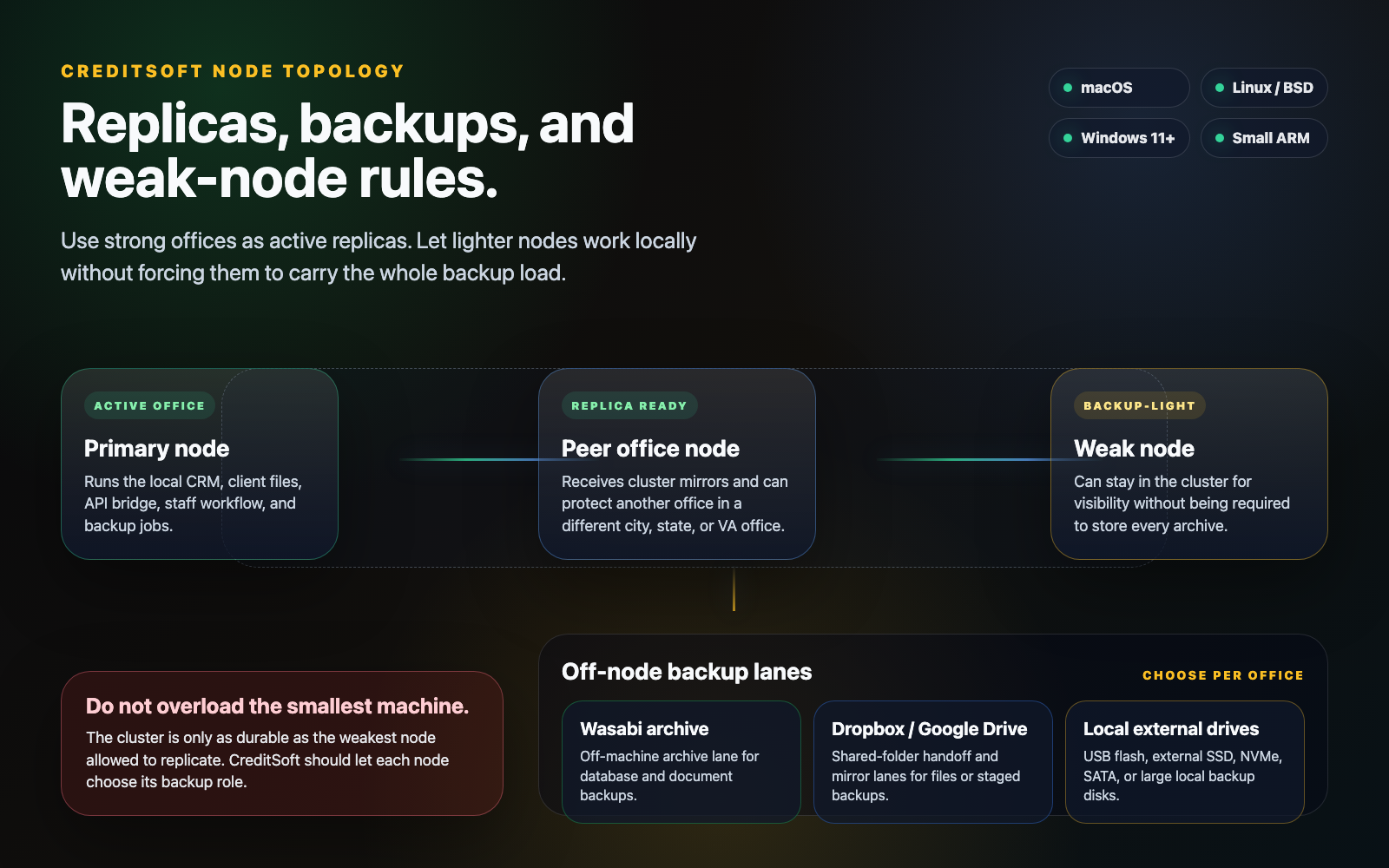
The intended deployment is not one fragile machine. Offices can run primary, replica, and backup-light nodes in different places, with each node's backup role matched to the hardware it actually has.

CreditSoft node topology visual showing a primary office node, peer office replica, backup-light weak node, and off-node backup lanes.
Replica and backup topology
Product proof

Replica and backup topology in the CreditSoft workspace

Click the screenshot to open the full-size shadow-box view. This page should never feel like a text-only placeholder when the feature menu sends someone here.

Replica policy

Do not let the weakest machine define every office.

Multi-office only works when each node has an honest role. Strong nodes can replicate and store archives. Weak nodes can still participate without carrying work they cannot safely hold.

Strong nodes protect the cluster

Desktops, workstations, or servers with enough disk and memory can act as active replicas and receive peer backup copies.

Weak nodes stay backup-light

Small offices, low-storage laptops, or small ARM devices can keep local workflow online while skipping heavy peer archive duties.

Visibility stays separate from storage

Managers can see node health and office activity without forcing every machine to behave like the main archive server.

Backup lanes

Backups should not depend on only another office computer.

CreditSoft should let each office choose local, cloud, and peer-mirror lanes based on the hardware and compliance posture of that location.

Wasabi archive

Use S3-compatible Wasabi storage as the durable off-machine archive when a local node should not be the only safety net.

Dropbox or Google Drive handoff

Use familiar shared-folder lanes for exports, staged document mirrors, and non-technical handoff workflows.

Local flash and external drives

Support USB flash drives, external SSDs, NVMe/SATA storage, and large local drives for offices that want physical backup copies.

Hardware fit

The node can be flexible, but the math still has to be honest.

CreditSoft should run on supported office hardware without pretending all hardware has the same storage, memory, or uptime profile.

Supported targets

Plan for macOS, Ubuntu/Linux/BSD, Windows 11+, and small ARM systems when they have enough memory, disk, and container support.

Capacity follows the role

A backup node needs real storage. A visibility node can be lighter. A replica node should be sized like it may need to recover the office.

Locations are the point

Nodes are meant for different cities, states, or VA offices so one building, ISP, or workstation does not become the whole business.

Replica roles should match the weakest node

A cluster is only as durable as the smallest node allowed to replicate, so strong nodes should carry the heavy backup work.

Weak offices can run backup-light

A low-disk or low-memory office can stay useful for local work and manager visibility without being forced to store every archive.

Wasabi, Dropbox, Google Drive, and local drives

Off-node backup lanes keep replicas honest: Wasabi for durable archives, Dropbox or Google Drive for handoff, and removable drives for local copies.